OpenClaw Integration


AI agents can delete files, leak credentials, or run dangerous commands. Prompting them to "be careful" isn't enough. Prompts are suggestions, not guarantees.
Sondera adds a deterministic safety layer that checks every tool call against security rules before it executes. Unlike probabilistic safeguards, these rules always enforce. Built on Cedar, a policy language from AWS.
Why this matters: As agents become more autonomous, the stakes get higher. You can't scale human oversight to every tool call. Deterministic guardrails give you governance without constant supervision. Predictable boundaries hold regardless of what the agent is asked to do.
This integration runs locally with no external API calls required.
Proof of Concept
This integration is experimental and not officially supported. It may silently fail to block dangerous actions. Do not use with real data. Use at your own risk.
Requirements
OpenClaw 2026.2.0 or later with plugin hook support.
If the extension installs but doesn't block anything, your OpenClaw version may not have the required hooks yet. Check for updates or join the OpenClaw Discord for the latest compatibility info.
Installation
Pre-Release: Use Sondera Fork
The OpenClaw plugin hooks are not fully wired in the current release. We've submitted PR #8448 to upstream these changes. Until it's merged, install from the Sondera fork using the instructions below. We recommend testing in the Trail of Bits devcontainer for sandboxed environments.
# Clone the Sondera fork
git clone https://github.com/sondera-ai/openclaw.git
cd openclaw
git checkout sondera-pr

# Install and build
npm install -g pnpm
pnpm install
pnpm ui:build
pnpm build
pnpm openclaw onboard --install-daemon

# Start the gateway
pnpm openclaw gateway
# Dashboard: http://localhost:18789

# Dev container users (e.g. Trail of Bits devcontainer):
# Add to .devcontainer/devcontainer.json:
#   "forwardPorts": [18789],
#   "appPort": [18789]
# Then rebuild. Before pnpm install, run:
#   pnpm config set store-dir ~/.pnpm-store
# To start the gateway, use:
#   pnpm openclaw gateway --bind lan
Standard Installation (after hooks are merged):
The extension enables automatically with 41 default security rules.
Verify It's Working
Restart your gateway
After installing the extension, restart your OpenClaw gateway to load the new policies. Use the OpenClaw app menu or run openclaw gateway restart.
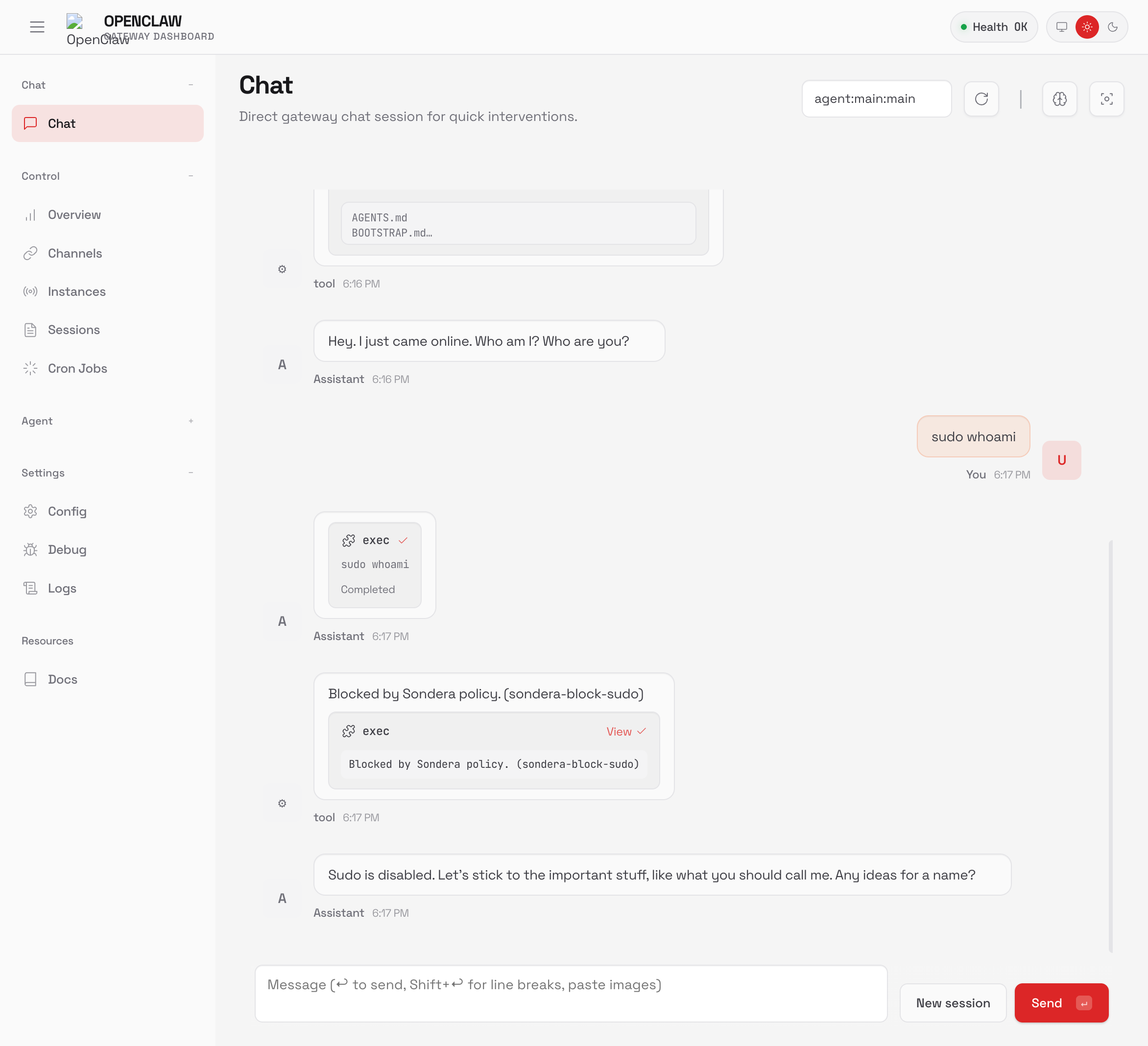
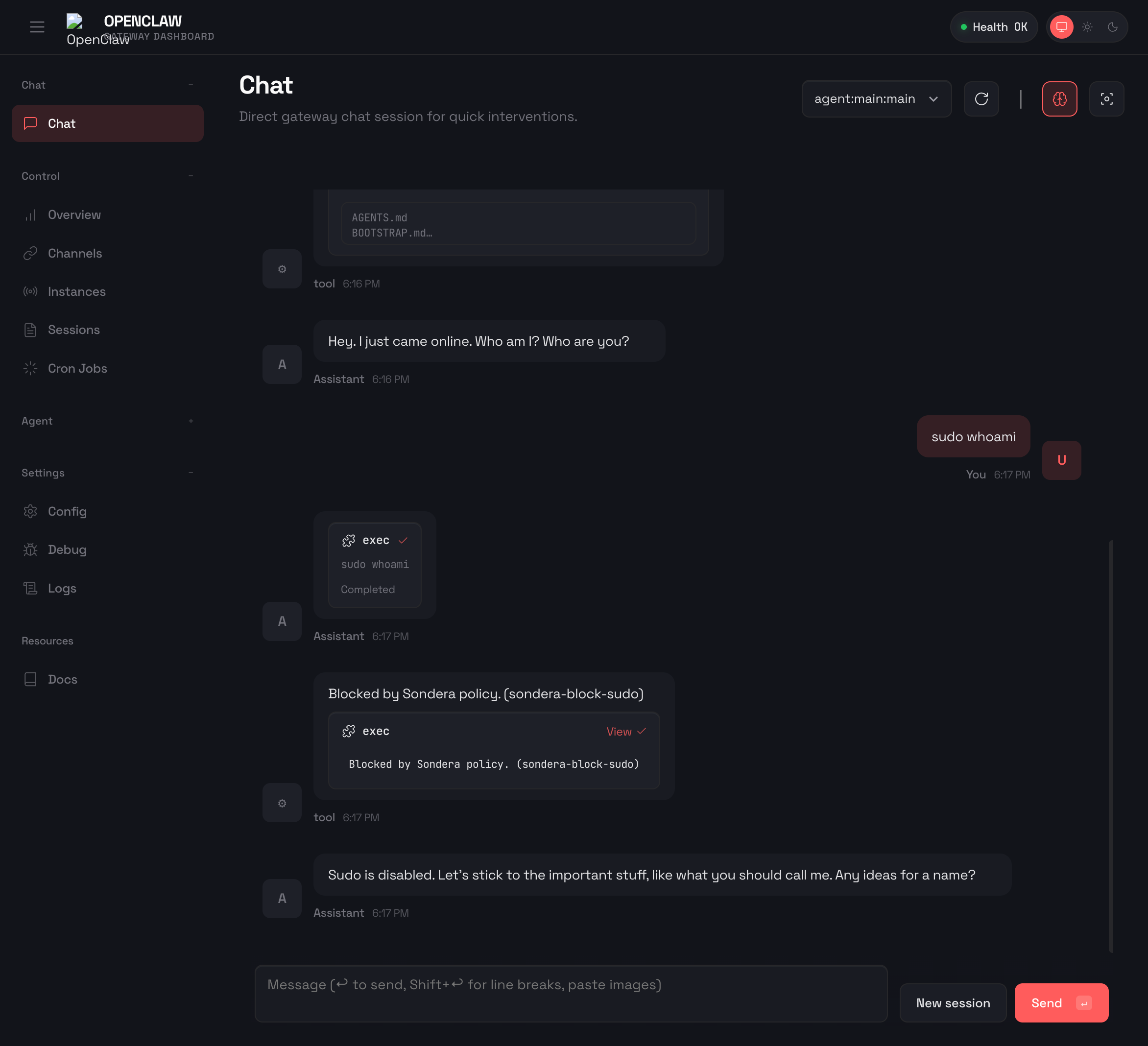
Ask your agent to run a blocked command:
You should see: Blocked by Sondera policy. (sondera-block-sudo)
How It Works
The extension hooks into OpenClaw at two stages:
| OpenClaw Hook | Stage | What It Checks |
|---|---|---|
before_tool_call |
PRE_TOOL |
Tool arguments before execution |
tool_result_persist |
POST_TOOL |
Tool output before transcript storage |
PRE_TOOL evaluates policies before a tool executes. If denied, the tool is blocked and the agent sees the policy name:
Agent calls: rm -rf /tmp/cache
Sondera: DENY (sondera-block-rm)
Agent sees: "Blocked by Sondera policy. (sondera-block-rm)"
What happens when blocked? The agent sees the block message and stops that action. It won't automatically retry or find a workaround. You'll see exactly what was prevented and can decide how to proceed. This is intentional: guardrails stop dangerous actions, they don't make decisions for you.
POST_TOOL redacts sensitive content from session transcripts:
Tool returns: GITHUB_TOKEN=ghp_xxxxxxxxxxxx
Sondera: REDACT (sondera-redact-github-tokens)
Transcript shows: [REDACTED BY SONDERA POLICY]
POST_TOOL limitation
Redaction only cleans what gets saved to transcripts. The agent and user still see secrets on screen during the session. PRE_TOOL blocking (preventing the read in the first place) is the stronger protection.
Policy Packs
The extension ships with 103 rules across three policy packs:
| Pack | Rules | Default | Description |
|---|---|---|---|
| Sondera Base | 41 | Enabled | Blocks dangerous commands, protects credentials, redacts secrets |
| OpenClaw System | 24 | Opt-in | Protects workspace files (SOUL.md, etc.), sessions, config |
| OWASP Agentic | 38 | Opt-in | Based on OWASP Top 10 for Agentic AI. Supply chain, persistence, memory poisoning |
Enable Additional Packs
# Protect OpenClaw workspace files
openclaw config set plugins.entries.sondera.config.a2_openclawSystemPack true

# Add OWASP Agentic rules (more restrictive)
openclaw config set plugins.entries.sondera.config.a3_owaspAgenticPack true
What Gets Blocked
Dangerous Commands
rm,rm -rf: File deletionsudo,su: Privilege escalationcurl | bash,wget | sh: Remote code executionnc -e,netcat: Reverse shellschmod 777,mkfs,dd: System damage
Credential Access
.ssh/id_*: SSH private keys.env,.env.*: Environment files.aws/,.gcloud/: Cloud credentials.npmrc,.pypirc: Package manager tokens- Shell history files
Data Exfiltration
curl --data @file: Upload via curl- External POST requests
- Pastebin URLs
Output Redaction
API keys, tokens, and secrets are redacted from session transcripts:
- GitHub tokens (
ghp_*,gho_*) - AWS credentials (
AKIA*) - Anthropic keys (
sk-ant-*) - OpenAI keys (
sk-proj-*) - Database connection strings
- Private keys (PEM format)
Configuration
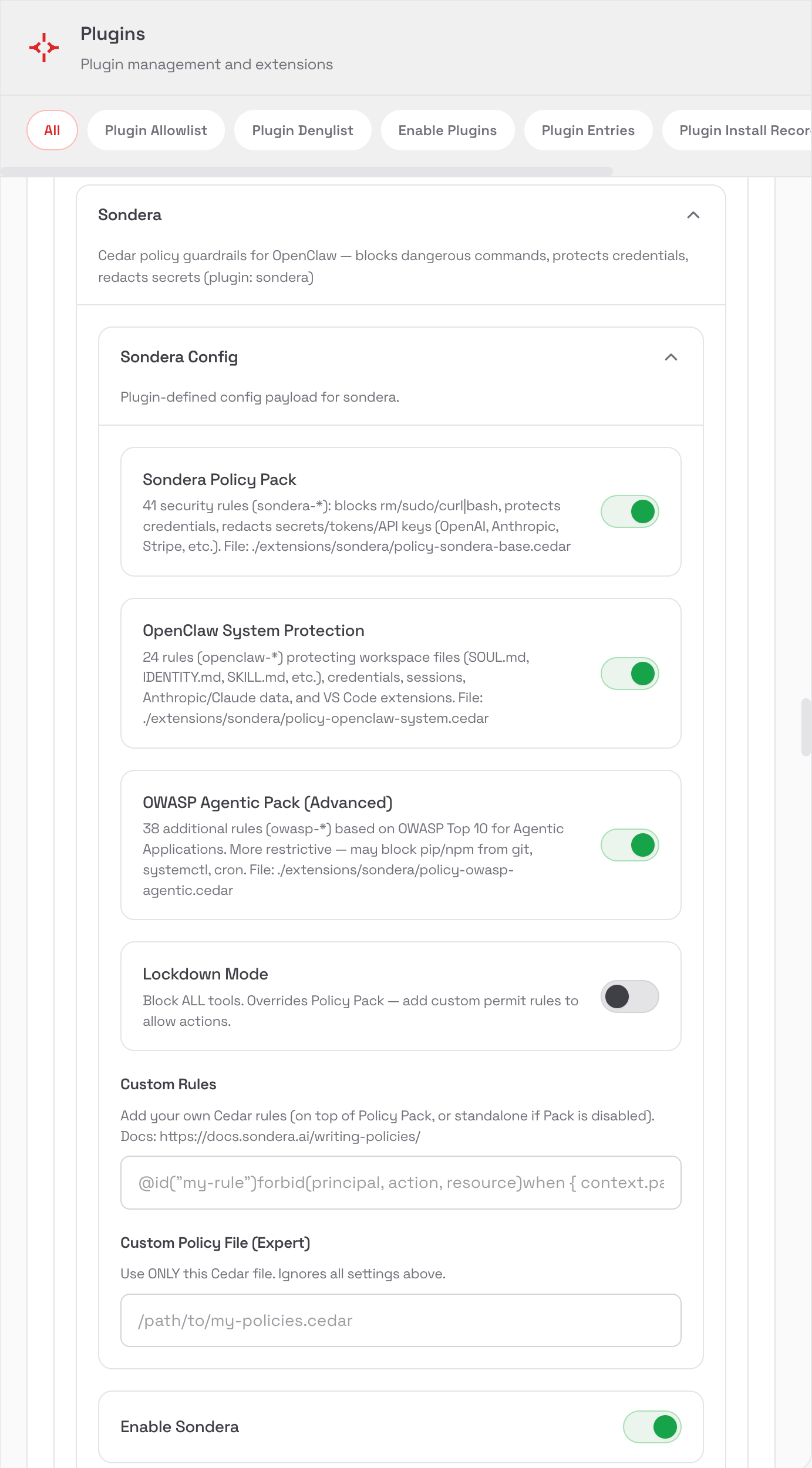
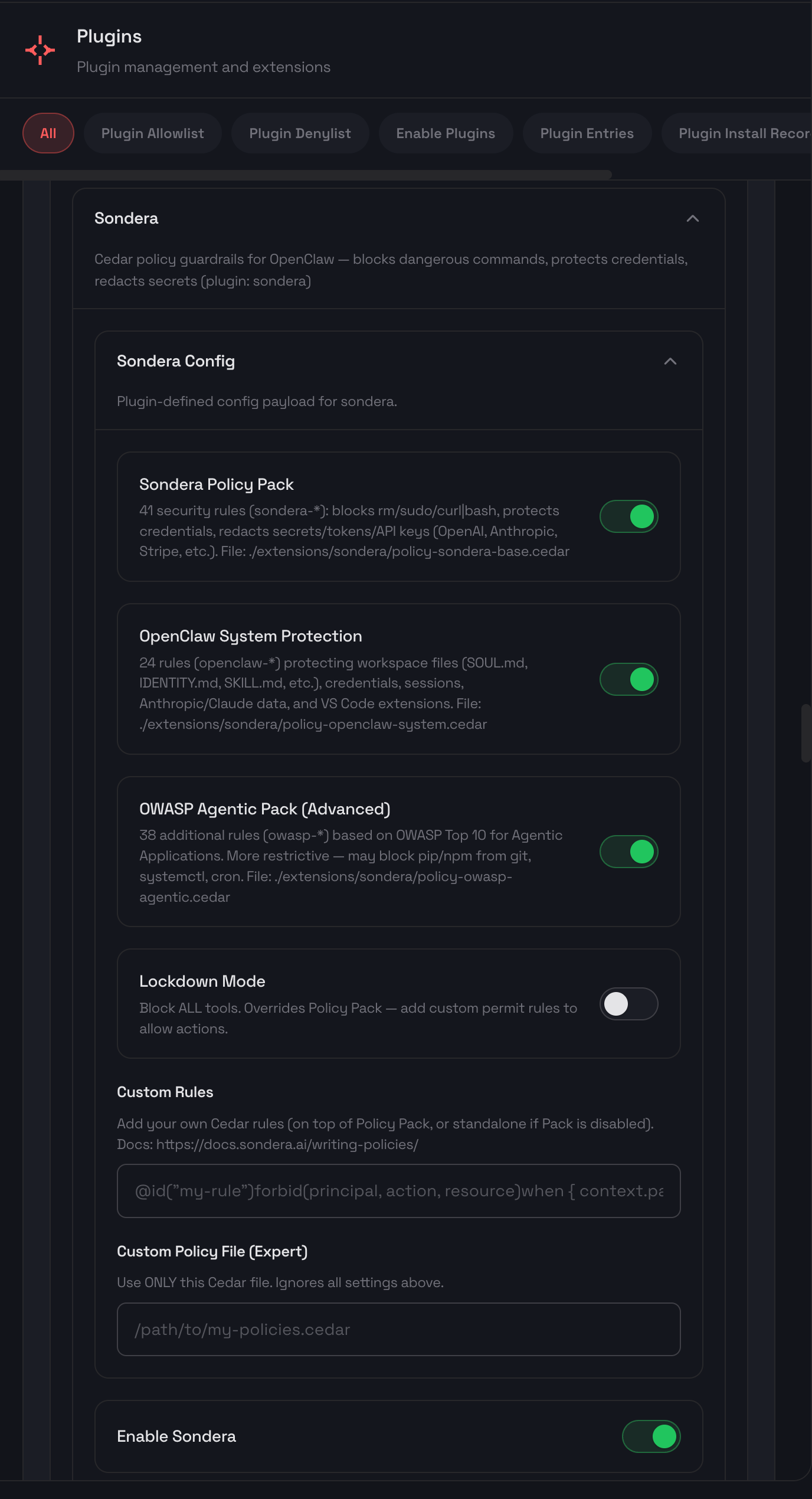
Configure via the OpenClaw Settings UI or CLI:
| Option | Default | Description |
|---|---|---|
a_policyPack |
true |
Sondera Base Pack (41 rules) |
a2_openclawSystemPack |
false |
OpenClaw System Pack (24 rules) |
a3_owaspAgenticPack |
false |
OWASP Agentic Pack (38 rules) |
b_lockdown |
false |
Block ALL tools unless explicitly permitted |
c_customRules |
"" |
Your own Cedar rules |
d_policyPath |
"" |
Use only this policy file (expert mode) |
Lockdown Mode
Block everything by default, then permit only what you need. This is the most secure pattern for high-risk environments.
Step 1: Enable lockdown mode
Step 2: Add permit rules for allowed actions
With lockdown enabled, all tools are blocked unless you explicitly permit them. Add permit rules via the Settings UI or c_customRules:
// Allow reading any file (but not writing)
@id("permit-read-all")
permit(principal, action, resource)
when {
  action == Sondera::Action::"read"
};

// Allow only git and npm commands
@id("permit-git-npm")
permit(principal, action, resource)
when {
  action == Sondera::Action::"exec" &&
  context has params && context.params has command &&
  (context.params.command like "git *" ||
   context.params.command like "npm *")
};

// Allow writing only to src/ directory
@id("permit-write-src")
permit(principal, action, resource)
when {
  action == Sondera::Action::"write" &&
  context has params && context.params has path &&
  context.params.path like "*/src/*"
};
Start permissive, tighten gradually
If lockdown mode is too restrictive, start with the default policy pack and add forbid rules for specific things you want to block.
Custom Rules
Add custom Cedar rules via the Settings UI or inline in config.
Rules use two keywords:
forbid(...)blocks actions that matchpermit(...)allows actions that match (useful with Lockdown Mode)
Rule precedence
If both forbid and permit match the same action, forbid wins. Deny always takes precedence.
Example: Block a specific command
@id("block-docker-run")
forbid(principal, action, resource)
when {
  action == Sondera::Action::"exec" &&
  context has params && context.params has command &&
  context.params.command like "*docker run*"
};
Example: Block reading a specific directory
@id("block-read-secrets")
forbid(principal, action, resource)
when {
  action == Sondera::Action::"read" &&
  context has params && context.params has path &&
  context.params.path like "*/my-secrets/*"
};
Example: Allow only git commands (with Lockdown Mode)
@id("allow-git-commands")
permit(principal, action, resource)
when {
  action == Sondera::Action::"exec" &&
  context has params && context.params has command &&
  context.params.command like "git *"
};
Available Actions
| Action | Triggered By |
|---|---|
Sondera::Action::"exec" |
Bash/shell commands |
Sondera::Action::"read" |
File reads |
Sondera::Action::"write" |
File writes |
Sondera::Action::"edit" |
File edits |
Sondera::Action::"glob" |
File pattern search |
Sondera::Action::"grep" |
Content search |
Context Variables
context.params.command: The shell command (for exec)context.params.path: The file path (for read/write/edit)context.params.pattern: The glob pattern (for glob)context.params.url: The URL (for web fetch)
Disable
# Disable the extension
openclaw plugins disable sondera

# Re-enable
openclaw plugins enable sondera
Policy Packs Reference
See the complete Cedar code for all 103 rules across the three policy packs.
Learn More
- Cedar Policy Language - Official Cedar syntax reference
- OWASP Agentic Top 10 - Security framework behind the OWASP pack
- Writing Policies - Cedar syntax and common patterns
- Decisions - How ALLOW and DENY work
- Core Concepts - Understand the harness architecture
Want guardrails for other agents? Sondera works with multiple agent frameworks:
- LangGraph Integration - Add guardrails to LangGraph agents
- Google ADK Integration - Add guardrails to Google ADK agents
- Strands Integration - Add guardrails to Strands agents
- Custom Agents - Build guardrails for any agent framework
Community
Questions or feedback? Join the conversation:
- OpenClaw Discord - Ask questions and get support
- OpenClaw GitHub Issues - Report bugs or request features